Content Browser Mobile3.7.1 - App Store

Please wait ... The app listing is being verified for availability.
You'll be able to see results in few seconds.


Publisher Description

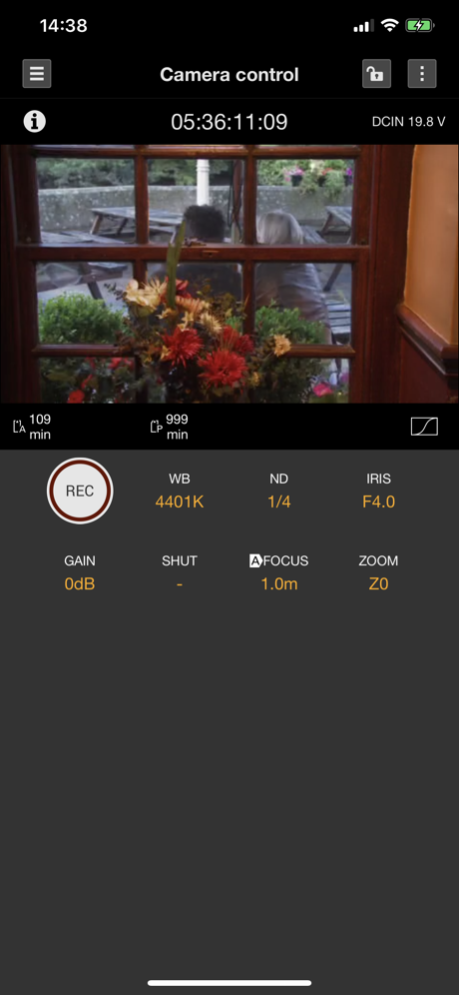
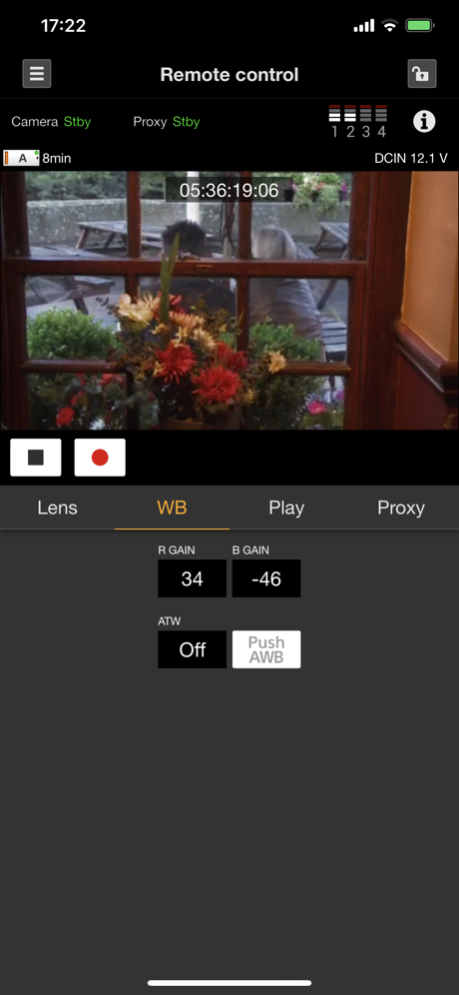
Content Browser Mobile is an application to remotely control CBK-WA100/101 Wireless Adapter and Wi-Fi compatible Sony professional camcorders/recorders.

LIVE OPERATION
- Monitoring live video from camcorders/recorders
- Displaying the status of connected devices
- Remotely controlling focus, zoom, rec start/stop, and etc.
- Live logging (Essence Mark)

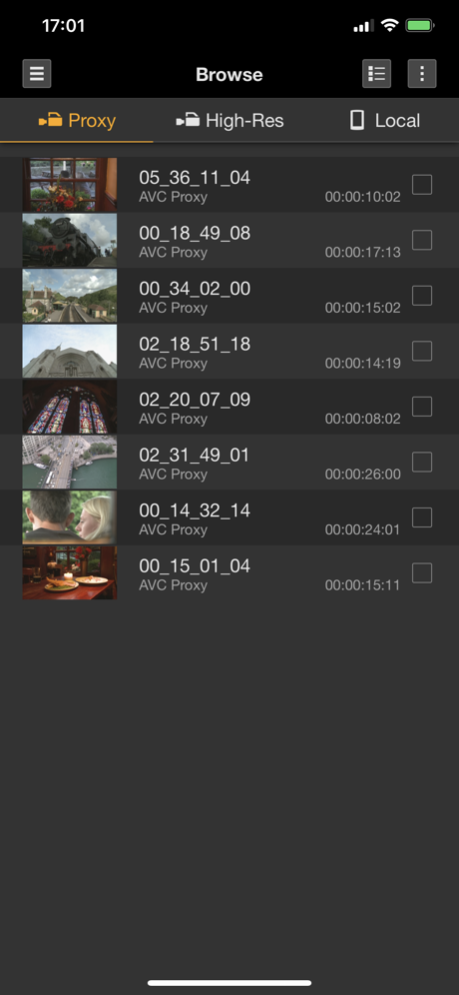
BROWSE
- Displaying the clip list
- Playing clips
- Editing metadata of clips

TRANSFER
- Uploading clips to FTP, FTPS, or other servers
- Uploading clips partially by marking in and out points
- Downloading clips to mobile devices
- Managing transfer jobs via job lists

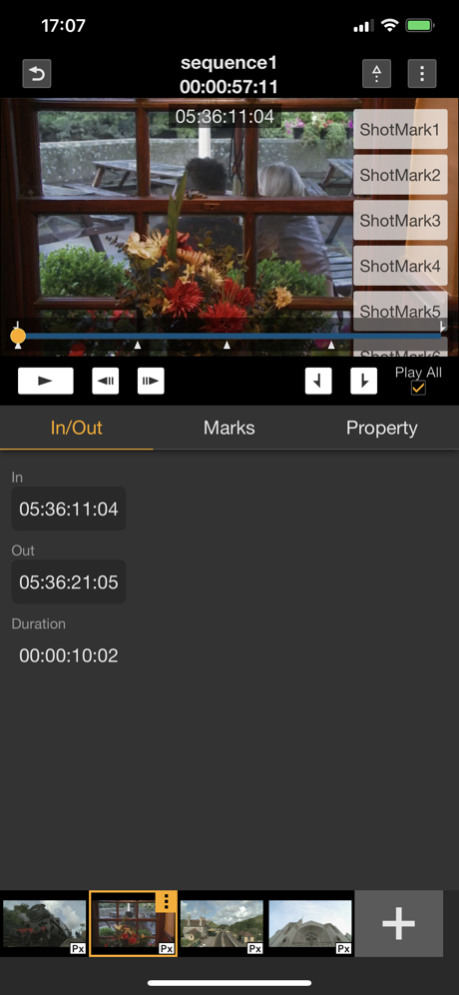
STORYBOARD
- Rough cut editing
- Uploading clips partially and an EDL based on storyboards

PLANNING METADATA
- Naming clips
- Assigning Essence Mark lists to buttons
- Browsing and uploading related clips

TC LINK
- Synchronizing the timecode of multiple camcorders

DEVICE SETTINGS
- Making setting of network functions for connected devices

NOTES:
- System Requirements
OS: iOS/iPadOS 15.0〜16.5

- For details about usage, please see the help page below.
https://helpguide.sony.net/promobile/cbm/v2/en/index.html

Version History - Supported ILME-FX6 V4.0
- Bug fixes and improvements 3.7.1 08/17/2023 - Bug fixes and improvements 3.7.0 07/15/2022 [Supported features]
- Remote control of ILME-FX6 V2.0
- Connection by scanning the QR code of the camera's user name/password
- Display of chunk clips
- Compatible with iOS 15
- Bug fixes and improvements 3.6.0 01/11/2022 - Supporting to display conformity assessment for French accessibility law 3.5.1 06/23/2021 [Supported features]
- Remote control of ILME-FX6
- Connecting to camera with USB Tethering
[Others]
- Bug fixes and improvements 3.5.0 11/17/2020 - Fixed a problem that CBM V3.4.0 cannot control IRIS value in combination with PXW-FX9 V1.0. 3.4.1 09/09/2020 [Supported features]
- Remote control of PXW-FX9 V2.0
- UX improvements
- Changed the manual operation of White Balance for FX9 from R/B Gain to Color Temperature/Tint value adjustment.
- Added proxy download function to player screen of the connected device.
- Changed to be able to play outside mark in/out on player screen.
- Changed job list names.
- Added share function of MP4 files downloaded in mobile device.
[Others]
- Bug fixes and improvements 3.4.0 08/28/2020 [Supported features]
- Remote control of PXW-FX9 with new monitoring UI
- Automatically moving to menu after connecting
[Others]
- Bug fixes and improvements 3.3.0 10/15/2019 - Supported the remote control of CBK-FS7BK
- Supported the Files App integration
- Bug fixes and improvements 3.2.0 07/19/2019 - Supported the remote control of PXW-Z280 3.1.0 06/05/2018 - Supported the remote control and TC Link of PXW-Z90/HXR-NX80
- Supported the Wired LAN connection
- Improved UX 3.0.0 11/14/2017 - Fixed the issue that this application occasionally crashes on the Monitoring menu. 2.4.1 09/08/2017 - Supported the Planning Metadata feature of PXW-X500/X400/Z450*

* The firmware update of camcorders is required.
PXW-X500 : V5.1(Net-Func : V3.03) or later
PXW-X400 : V3.1(Net-Func : V3.04) or later
PXW-Z450 : V2.0(Net-Func : V3.05) or later 2.4.0 07/12/2017 - Fixed the issue that this application crashes on iOS 10.3 devices. 2.3.1 04/13/2017 - Supported iOS 10

- Supported the status display of Network Client Mode

- Supported the display of arbitrary metadata described within the Planning Metadata

- Supported the URL scheme 2.3.0 10/30/2016 - Fixed bugs that occur on iOS 10 devices. 2.2.1 09/16/2016 - Supported the partial upload of High-Res clips in connected devices*1

- Supported High-Res clips in the storyboard*1

- Supported the editing metadata in the storyboard

- Supported the displaying of the status of connected devices in the monitoring

- Supported the live logging of the PDW-750/850*2

- Improved the UI of the landscape layout

*1 Updating the firmware version of the connected devices is required. For details on devices and formats compatible, consult your dealer.
*2 Updating the firmware version(V3.0 or later) of the PDW-750/850 is required. 2.2.0 04/04/2016 - Supported the storyboard feature*

- Supported the upload of clips to PWS-100RX1*

- Supported the browse of clips recorded by Planning Metadata

* Updating the firmware version of the Wireless Adapter to V2.2 is required 2.1.0 12/04/2015 - Fixed the issue that this application crashes on iOS 9 devices. 2.0.2 10/05/2015 - Fixed the issue that the remote control of Iris does not work with X180 and X500 on 64-bit devices. 2.0.1 08/05/2015 - Partial upload of Proxy clips in connected devices
* WA firmware V2.0 is required

- Remote control via Wi-Fi tethering

- Improved logging features; logging is reflected on both High-Res and Proxy clips

- Browsing High-Res clips recorded in parallel with proxies

- Planning Metadata functions of PDW-750/850 available

- Increased number of Essence Mark buttons; 10 buttons

- Downloading clips to public location in mobile devices available 2.0.0 07/02/2015 - iOS 8 Support

- Essence Mark Support
Live Logging while recording and editing Essence Mark after recording are supported.
※Ask Sony service centers about devices that support live logging.

- Clip Upload from mobile devices Support
Proxy clips downloaded to your mobile devices can be transferred with FTP/FTPS. The transfer process is managed by Job list.

- Monitoring Improved
Monitoring status display is supported.

- Upload Function Improved
Default Sever/Destination Directory in Device settings can be reflected on uploading clips. 1.5.0 12/20/2014 - Fixed the issue

Fixed the issue that the CBM cannot frequently search PXW-X70 when 3G/4G/LTE connection is activated.

Fixed the issue that the CBM frequently fails to download MP4 files from the Wireless Adapter. 1.4.1 10/21/2014 - New product Support
PXW-X70 remote controller is supported

- Clip Download/Browse
MP4 files recorded in Wireless Adapter can be downloaded to a smartphone, or tablet device. Browsing the downloaded MP4 files is available. 1.4.0 09/12/2014 Fixed the problem

Fixed the problem that the CBM does not work when the wireless adapter is connected to the camcorder/recorder without USB cable. 1.3.1 07/11/2014


About Content Browser Mobile

Content Browser Mobile is a free app for iOS published in the Other list of apps, part of Network & Internet.

The company that develops Content Browser Mobile is Sony Corporation. The latest version released by its developer is 3.7.1.

To install Content Browser Mobile on your iOS device, just click the green Continue To App button above to start the installation process. The app is listed on our website since 2026-10-13 and was downloaded 0 times. We have already checked if the download link is safe, however for your own protection we recommend that you scan the downloaded app with your antivirus. Your antivirus may detect the Content Browser Mobile as malware if the download link is broken.

How to install Content Browser Mobile on your iOS device:

  • Click on the Continue To App button on our website. This will redirect you to the App Store.
  • Once the Content Browser Mobile is shown in the iTunes listing of your iOS device, you can start its download and installation. Tap on the GET button to the right of the app to start downloading it.
  • If you are not logged-in the iOS appstore app, you'll be prompted for your your Apple ID and/or password.
  • After Content Browser Mobile is downloaded, you'll see an INSTALL button to the right. Tap on it to start the actual installation of the iOS app.
  • Once installation is finished you can tap on the OPEN button to start it. Its icon will also be added to your device home screen.

Program Details


General

Publisher
Released Date
2026-10-13
Languages
English

Category

Category
Subcategory

System requirements

Operating systems
iOS

Download information

File size
14 bytes
Total downloads
0

Pricing

License model
Free
Price

Version History


Here you can find the changelog of Content Browser Mobile since it was posted on our website on 2016-11-09. The latest version is 3.7.1 and it was updated on Apps112 on 16 October, 2026. See below the changes in each version:

version 3.7.1

posted on 2026-10-13

Version History - Supported ILME-FX6 V4.0
- Bug fixes and improvements 3.7.1 08/17/2023 - Bug fixes and improvements 3.7.0 07/15/2022 [Supported features]
- Remote control of ILME-FX6 V2.0
- Connection by scanning the QR code of the camera's user name/password
- Display of chunk clips
- Compatible with iOS 15
- Bug fixes and improvements 3.6.0 01/11/2022 - Supporting to display conformity assessment for French accessibility law 3.5.1 06/23/2021 [Supported features]
- Remote control of ILME-FX6
- Connecting to camera with USB Tethering
[Others]
- Bug fixes and improvements 3.5.0 11/17/2020 - Fixed a problem that CBM V3.4.0 cannot control IRIS value in combination with PXW-FX9 V1.0. 3.4.1 09/09/2020 [Supported features]
- Remote control of PXW-FX9 V2.0
- UX improvements
- Changed the manual operation of White Balance for FX9 from R/B Gain to Color Temperature/Tint value adjustment.
- Added proxy download function to player screen of the connected device.
- Changed to be able to play outside mark in/out on player screen.
- Changed job list names.
- Added share function of MP4 files downloaded in mobile device.
[Others]
- Bug fixes and improvements 3.4.0 08/28/2020 [Supported features]
- Remote control of PXW-FX9 with new monitoring UI
- Automatically moving to menu after connecting
[Others]
- Bug fixes and improvements 3.3.0 10/15/2019 - Supported the remote control of CBK-FS7BK
- Supported the Files App integration
- Bug fixes and improvements 3.2.0 07/19/2019 - Supported the remote control of PXW-Z280 3.1.0 06/05/2018 - Supported the remote control and TC Link of PXW-Z90/HXR-NX80
- Supported the Wired LAN connection
- Improved UX 3.0.0 11/14/2017 - Fixed the issue that this application occasionally crashes on the Monitoring menu. 2.4.1 09/08/2017 - Supported the Planning Metadata feature of PXW-X500/X400/Z450*

* The firmware update of camcorders is required.
PXW-X500 : V5.1(Net-Func : V3.03) or later
PXW-X400 : V3.1(Net-Func : V3.04) or later
PXW-Z450 : V2.0(Net-Func : V3.05) or later 2.4.0 07/12/2017 - Fixed the issue that this application crashes on iOS 10.3 devices. 2.3.1 04/13/2017 - Supported iOS 10

- Supported the status display of Network Client Mode

- Supported the display of arbitrary metadata described within the Planning Metadata

- Supported the URL scheme 2.3.0 10/30/2016 - Fixed bugs that occur on iOS 10 devices. 2.2.1 09/16/2016 - Supported the partial upload of High-Res clips in connected devices*1

- Supported High-Res clips in the storyboard*1

- Supported the editing metadata in the storyboard

- Supported the displaying of the status of connected devices in the monitoring

- Supported the live logging of the PDW-750/850*2

- Improved the UI of the landscape layout

*1 Updating the firmware version of the connected devices is required. For details on devices and formats compatible, consult your dealer.
*2 Updating the firmware version(V3.0 or later) of the PDW-750/850 is required. 2.2.0 04/04/2016 - Supported the storyboard feature*

- Supported the upload of clips to PWS-100RX1*

- Supported the browse of clips recorded by Planning Metadata

* Updating the firmware version of the Wireless Adapter to V2.2 is required 2.1.0 12/04/2015 - Fixed the issue that this application crashes on iOS 9 devices. 2.0.2 10/05/2015 - Fixed the issue that the remote control of Iris does not work with X180 and X500 on 64-bit devices. 2.0.1 08/05/2015 - Partial upload of Proxy clips in connected devices
* WA firmware V2.0 is required

- Remote control via Wi-Fi tethering

- Improved logging features; logging is reflected on both High-Res and Proxy clips

- Browsing High-Res clips recorded in parallel with proxies

- Planning Metadata functions of PDW-750/850 available

- Increased number of Essence Mark buttons; 10 buttons

- Downloading clips to public location in mobile devices available 2.0.0 07/02/2015 - iOS 8 Support

- Essence Mark Support
Live Logging while recording and editing Essence Mark after recording are supported.
※Ask Sony service centers about devices that support live logging.

- Clip Upload from mobile devices Support
Proxy clips downloaded to your mobile devices can be transferred with FTP/FTPS. The transfer process is managed by Job list.

- Monitoring Improved
Monitoring status display is supported.

- Upload Function Improved
Default Sever/Destination Directory in Device settings can be reflected on uploading clips. 1.5.0 12/20/2014 - Fixed the issue

Fixed the issue that the CBM cannot frequently search PXW-X70 when 3G/4G/LTE connection is activated.

Fixed the issue that the CBM frequently fails to download MP4 files from the Wireless Adapter. 1.4.1 10/21/2014 - New product Support
PXW-X70 remote controller is supported

- Clip Download/Browse
MP4 files recorded in Wireless Adapter can be downloaded to a smartphone, or tablet device. Browsing the downloaded MP4 files is available. 1.4.0 09/12/2014 Fixed the problem

Fixed the problem that the CBM does not work when the wireless adapter is connected to the camcorder/recorder without USB cable. 1.3.1 07/11/2014

version 3.7.1

posted on 2023-08-17

- Supported ILME-FX6 V4.0
- Bug fixes and improvements

version 3.7.1

posted on 2023-08-17

Aug 17, 2023
Version 3.7.1
- Supported ILME-FX6 V4.0
- Bug fixes and improvements

version 3.7.0

posted on 2022-07-15

Jul 15, 2022
Version 3.7.0
- Bug fixes and improvements

version 2.3.0

posted on 2014-01-20

Disclaimer


Official App Store Link


We do not host Content Browser Mobile on our servers. We did not scan it for viruses, adware, spyware or other type of malware. This app is hosted by Apple and passed their terms and conditions to be listed there. We recommend caution when installing it.

The App Store link for Content Browser Mobile is provided to you by apps112.com without any warranties, representations or guarantees of any kind, so access it at your own risk.

If you have questions regarding this particular app contact the publisher directly. For questions about the functionalities of apps112.com contact us.


Click stars to rate this APP!

Users Rating:
  0.0/5     0
Downloads: 0
Updated At: 2026-10-16
Publisher: Sony Corporation
Operating System: iOS
License Type: Free

TOP DOWNLOADS
in Network & Internet last week